
Công ty cổ phần công nghệ và tư vấn CIC
Specialized
Home > News > Specialized > KOMPAS-3D V24 Launches with Major Upgrades for Mechanical Design
Construction Robots and Their Practical Value for Modern Construction Sites
KOMPAS-3D V24 Launches with Major Upgrades for Mechanical Design
5 Principles for Effective BIM Implementation in Vietnam
OpenFlows Water & Sewer 2026 – Bentley’s Powerful Software Duo

enjiCAD 2027 Officially Launched with Breakthrough Performance and an Enhanced Design Experience...
Nội dung chính
KOMPAS-3D V24 Launches with Major Upgrades for Mechanical Design
18/09/2026
Lượt xem 2
KOMPAS-3D V24 delivers a series of notable upgrades to its interface, parametric design, 3D modeling, assembly management, geometry checking, and particularly Reverse Engineering. The new version also expands its ability to read CAD data popular platforms such as Inventor, Creo, and SOLIDWORKS.
KOMPAS-3D V24 Introduction Video ASCON
The changes in KOMPAS-3D V24 are not limited to the addition of new commands. They are also designed to improve the entire design experience, working with the interface and building parametric models to managing assemblies and processing CAD data. Below are the key features and enhancements that help engineers work more efficiently with increasingly complex models.
Improved Interface for Easier Work with Complex Models
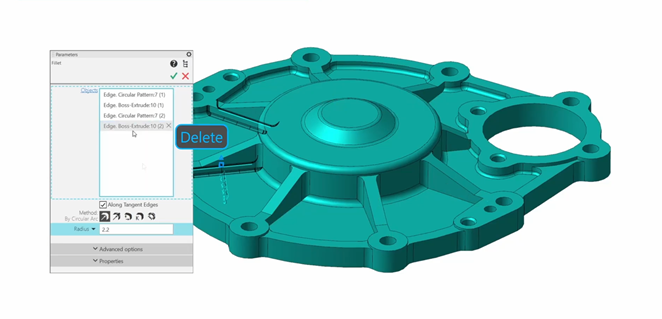
KOMPAS-3D V24 completely redesigns the Parameters dialog box, consolidating settings into a unified list and adding a search function by name. Elements can be quickly deleted using the Delete key. In addition, sequence numbers have been added to individual elements in the design history tree, making it easier to identify and manage modifications in models with complex design histories.
Major Improvements to Parametric Design and Pattern Creation
Version V24 introduces two new features: Parametric Array by Grid and Array by Concentric Grid. These tools allow users to create object patterns directly within a sketch. Once created, their parameters can continue to be controlled using variables. These features are also supported in the Drawing environment.
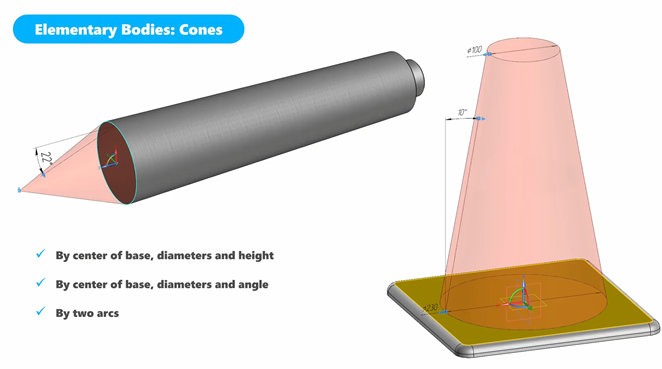
The new version also introduces a Cone creation tool with multiple methods for defining its geometry.
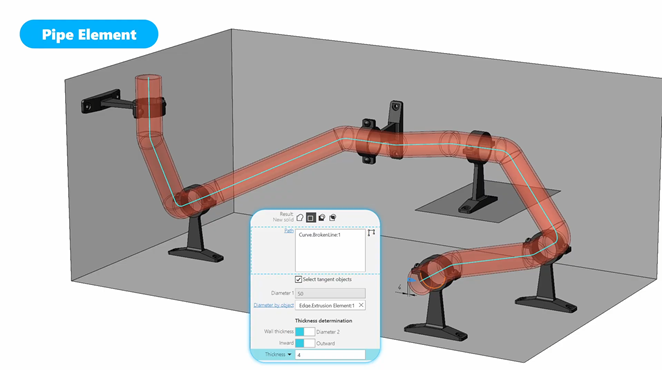
Pipe Element Simplifies Pipe Creation
Pipe Element allows users to create a body or perform a cutting operation using only a path and a cross-sectional diameter. The trajectory length is included in the variable system, allowing users to define a value range and control the path length within a parametric model.
Edit Components Directly within an Assembly
Users can modify the shape of a component directly within an assembly without editing the original component file. The modified parameters are stored in the assembly file.
V24 also supports copying components between assemblies using Ctrl+C and Ctrl+V. The new Copy Management function allows users to search for copied components, check their status, and update copying operations across multiple assemblies.
Geometry Check Added and Direct Editing Enhanced
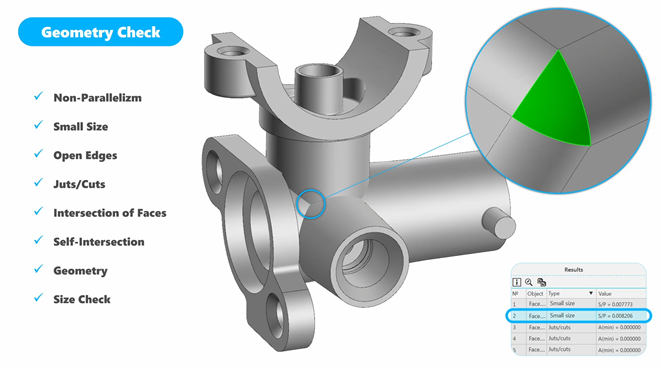
Geometry Check supports the inspection and diagnosis of geometric objects such as bodies, surfaces, and faces. It can detect components smaller than a specified value and identify geometric areas that may potentially cause errors or collisions. Direct Editing has also been expanded to support moving or rotating a group of faces by a specified angle.
Improved Surface Modeling
Replace Faces has been enhanced to replace one group of faces with another. Pattern creation commands can now select faces directly, while Mid-surface supports collections of faces. The Ball Rolling method has been added for surface rounding. Surface Extension can now extend multiple surfaces simultaneously and process additional cases involving bounded geometry.
Reverse Engineering Becomes a Key Highlight of V24
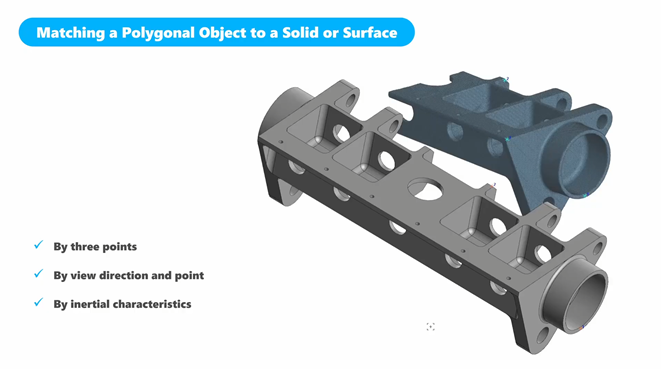
Surface Adjustment can automatically identify the type of surface based on a selected area, including Plane, Cone, Cylinder, Sphere, Torus, and Spline. The Match command allows users to align a polygonal model with a solid, surface, or another polygonal object using three points, a viewing direction and point, or inertia properties. Deviation Analysis has also been improved to provide more accurate deviation analysis.
Faster Assembly Processing and Expanded CAD Import Capabilities
V24 optimizes the processing speed of large assemblies, particularly when inserting heavy subassemblies, opening assemblies, previewing, rendering, and regenerating models. The 3D Kernel has been expanded to read additional data Autodesk Inventor, Creo, and Solid Edge, alongside NX and SOLIDWORKS, which were already supported.
Quick Assessment
Overall, KOMPAS-3D V24 does more than introduce new modeling commands. It delivers comprehensive upgrades across the CAD system, parametric design, Assembly Editing, and Direct Editing to Reverse Engineering and data exchange between CAD platforms.
Three Key Feature Groups:
-
Assembly Editing: Edit components without affecting source files, copy components, and manage copied instances.
-
Reverse Engineering: Identify surfaces, align scanned data, and analyze deviations.
-
Interoperability: Expanded support for reading data Inventor, Creo, and SOLIDWORKS.
With improvements to Assembly Editing, Reverse Engineering, and the ability to read data these popular software platforms, KOMPAS-3D can be a strong alternative to SOLIDWORKS, Inventor, Creo, NX, and other solutions for businesses operating in mechanical engineering, machine design, structural design, or 3D product development.
CIC CONSTRUCTION TECHNOLOGY AND CONSULTANCY JOINT STOCK COMPANY
Head office: 4th Floor, VG Building, 235 Nguyen Trai Street, Khuong Dinh Ward, Hanoi, Vietnam
Website: https://cic.com.vn
Email: info@cic.com.vn
Hotline: 0866 059 659

